Wednesday, December 15, 2010

Week 5. Assignment Due week 6 (January 12, 2011)

While you're away, please shoot 1 roll per week. Whatever you want.   (a total of 4 rolls min)
Try to continue to experiment with proximity, depth of field, shutter time (the longer it is the more movement you will capture) try shooting at night-  or alternative lighting conditions/sources.

The next class will be Jan 12. Please bring in all test strips, prints, contacts, rolls of film (you should have enough time to process and contact print the film you shot while away)

I want 10 good prints, utilize burning and dodging when necessary and filters.

Bring in all notes, film, contacts, TEST STRIPS and previous prints. Make sure to note all camera or enlarger settings, I can't help you, if i don't know what you did. After week 6 class there are only 2 classes left and we need to discuss the exhibition, which we can't have if there aren't tons of prints.

Week 5. Notes

Burning and Dodging

You may produce a print that has good overall exposure and contrast, but there may be areas which are too light or too dark. To lighten an area of the print dodging is used. To darken an area burning is used.

Dodging is selectively holding back exposure to lighten an area of a print. The amount of dodging varies from print to print. After determining the area that requires less exposure find a suitable opaque object (this will range from a circle of card board on a wire to a corner of paper to your hand) to block a portion of the print for some of the overall exposure time.   Whatever is used to block the light should be in motion to prevent hard lines of light being noticeable. 
Burning is selectively adding more exposure to darken an area of a print. The amount of burning varies from print to print. After determining the area that requires more exposure find a suitable form to allow light to pass through onto the desired area of a print. This form should be opaque to block light from the rest of the print. Paper, will allow some light through, while card stock or cardboard, or your hand will not. 
--------------------------------------------------------------------------------------------------------------------------
Alternative Lighting Conditions


Night photography


Just as how daylight photographers pay attention to the position and angle of the sun, night photographers should also pay careful attention to the moon.  A low-laying moon can create long shadows on cross-lit objects, whereas an overhead moon creates harsher, downward shadows.
An additional variable is that the moon can have varying degrees of intensity, depending where it is during its 29.5 day cycle of waxing and waning.  A full moon can be a savior for reducing the required exposure time and allowing for extended depth of field, while a moonless night greatly increases star visibility.  Furthermore, the intensity of the moon can be chosen at a time which provides the ideal balance between artificial light (streetlamps) and moonlight.
Gauging exposure times during a full moon can be tricky; use f/5.6 and 30 seconds at ISO 400 as a starting point (if subject is diffuse and directly lit), then adjust towards scenarios 1-4 accordingly if OK.
full moon
Another factor rarely noticed during daylight is movement of the light source (sun or moon).  The long exposure time required for moonlight photography often means that the moon may have moved significantly over the course of the exposure.  Moon movement softens harsh shadows, however too much movement can create seemingly flat light.

Subject in Moonlight – Static Chart

The following exposures are for f/8 using 400 ISO.
See the dynamic form below for different aperture and film settings. The exposure
times are rough starting points, the subject surface (reflection), ambient light and
other factors will effect your exposure. When in doubt, bracket.
Moon PhaseDays after Full

Full Moon
–

Gibbous Moon
3-4 days after

Quarter Moon
7 days after

Crescent Moon
10-11 days after

New Moon
14 days after

Note: The moon phases are reflexive, so 3 days after a full moon is the same
as 3 days before a full moon.  Moon Exposure Calculation LINK

Fill with FLASHLIGHTS


Without a sun, you can leave the shutter open fairly long and compose how you want. Try 2 minute exposure at f4 on 200 ISO or 1 min f4 400 ISO.  You will need a tripod. Set up your framing, and use the bulb (B) or time feature (T) on your shutter speeds. Bulb you will need to keep the shutter open manually, time will stay open until you trigger the shutter a second time. (this is recommended for longer exposures). Experiment with painting in subjects. Or using the flashlight to fill in dark areas where you might want detail. This works similarly to burning when printing. Use the flashlight to bring out more detail. 


FIRE (works, spinning, sparklers etc)

6 seconds in duration on 200 ISO at f4 or 6 seconds on 400 ISO at f5.6 for 6 seconds - just enough to light up the people. This is a base line suggestion, if you can meter, do- definitely brackett. Think about the photos you've seen where people write their names or draw pictures with laser pointers.

------------------------------------------------------------------------------------------------------------
Reciprocity Failure
Reciprocity Failure is a problem that occurs with film’s ability to evenly measure light during long exposures. The characteristics of film is that during an exposure it is initially very sensitive to light but as exposure time increases the film’s ability to record light is diminished. So what a light meter may tell you should be a 1-minute exposure, for a particular film that exposure may actually need to be 8-minutes.
here is a link to an HP5 correction chart for long exposures
Black and White films are effective more by the reciprocity failure than color or slide film.
--------------------------------------------------------------------------------------------------------------------------
Solarization
Solarisation is when the image recorded on a negative or on a photographic print is wholly or partially reversed in tone. Dark areas appear light or light areas appear dark. 
Solarization is the process of re-exposing photographic paper during the development process. The result is an eerie silver image which contains light lines between the shadows and the highlighted areas. 

Areas that have been exposed the least are affected the most during the re-exposure of the print. The darker areas or shadows on the prints show little change during the solarization process.
The term is synonymous with the Sabattier Effect when referring to negatives, but is technically incorrect when used to refer to prints
To begin the process, develop and agitate your paper normally. When the image begins to appear, remove the print from the developer and place it into a tray of water for about ten seconds. This will slow the development process.
The next step is to re-expose the paper to light. This exposure should last only about two seconds. The light source should be a low watt bulb, 15 to 20 watt, and should be three to four feet away from the print.

Th

e fi

nal step is to put the paper back into the developer .

A solarized print - ManRay


Tips for gaining maximum results.

  • Using high contrast papers will give you a more dramatic effect.
  • Slow films are easier to work with since they require longer exposure time to develop.
  • Since re-exposure effects the highlights, use a print with a lot of light areas to achieve the most dramatic results

The Sabattier Effect is essentially the same process, but done with the developing film and not the print. Explore at your own risk.

-------------------------------------------------------------------------------------------------------------------------
Paper Negative

There are two ways of using paper negatives.The paper is processed to give a negative, and a final positive print is obtained by contact printing. If you are metering the light set the ISO at anywhere between 4 and 10. You will need to experiment and "bracket". Write down your lighting conditions and exposure times. 


The paper negative is made by sandwiching the original positive print, emulsion-to-emulsion, with a fresh sheet of paper, and pressing them tightly together under a sheet of heavy glass. You then expose the “sandwich” to the light of the enlarger, just as if you were making a contact sheet from a roll of film negatives.  
A paper negative and the contact print
more info here on paper negatives
--------------------------------------------------------------------------------------------------------------------------
What a colour negative looks like if you process it as black & white & scan it:


Wednesday, December 8, 2010

Week 4 Assignment Due week 5

All work needs to be caught up

Camera settings and enlarger/timer settings should be recorded and stored with your contacts and prints.
This is what you will refer to when printing on your own.

Test Strips are Essential for figuring out the right exposure times! If you use them, you will make better prints.

As a group we need to come up with a theme, Joao suggested "Challenge"
I think we need to define or clairfy that or at least come up with a phrase for a group show.
This is what I want you guys to be thinking and applying to your photographs, so we can curate our work.

Bring to class:

  • printing paper
  • processed negatives (all 4 rolls)- the new roll maybe of whatever you choose keep in mind the theme
  • printed contacts (all 4 contacts)
  • test strips 
  • 7 new prints (with f stop, time, and filter noted on back)

Prints that were due this week will be referenced during crit next week and  while discussing technical issues. BRING THEM!!!
2 of them should be reprinted (unless we discussed otherwise) using filters to control the contrast and enhance the print quality.
In addition 5 more prints need to be made. These can be any images from any of the 4 assigned rolls, as long as you have not already printed them. I strongly recommend looking at your negatives for density (how much information is on them) and select easy negatives to print. I will send out emails with numbers from your contact sheets of images the class thought were interesting for potential enlargements. You will need to make test strips, and mark your print notes on the backs of each print so we can talk about how to improve our work. You have to use filters for these, even if it is only a #2.

Week 4. Notes

Image composition 

The Rule of Thirds. fig1One of the most popular 'rules' in photography is the Rule Of Thirds.  It works like this:
Imaginary lines are drawn dividing the image into thirds both horizontally and vertically. You place important elements of your composition where these lines intersect. 
As well as using the intersections you can arrange areas into bands occupying a third or place things along the imaginary lines. Good places to put things; third of the way up, third of the way in from the left.


The Diagonal Method


The 35 mm photographic frame is a rectangle with a ratio of 2:3. Within this rectangle you can draw two squares that overlap each other.


Using the Rule of Thirds and Diagonal method helps produce nicely balanced pictures.
Once you have got the hang of the Rule of Thirds you may want to break it. This is fine. These 'rules' are best used as guidelines.
Important compositional elements to think about beyond thirds:
  • What lines are being drawn- converging or dissecting? 
  • Diagonal lines can also be utilized in a similar way or in conjunction with the rule of thirds
  • What basic shapes are being made by your image? Geometric forms can and should be balanced in some way.
  • Light and Shadow- these should be balanced in some way they will make a major impact on the overall composition. 
  • When you slit your eyes before making an image, try to see what basic shapes or shadows are visible.
  • Eye movement is directed around your image by the use of different compositional elements.
Fill the frame.Sometimes your mind tends to exaggerate what you see through the viewfinder of your camera.It is easy to perceive things bigger than they actually are and not to notice 'slight' distractions. Thus ending up with is photographs with areas of wasted space around the edge or elements distracting from the subject in frame. The best way to do this is to move a bit closer. Before you press that shutter release look at the edges of the frame and behind your subject. Make sure that you don't have empty space and check for distractions in the frame. When the three dimensional world is flattened in your image elements can easily crowd or get in the way of one another.
------------------------------------------------------------------------------------------------------------------------------
The Final Print
In evaluating the quality of your print consider these factors:
Brightness
Contrast
Burning and Dodging
Brightness. Print exposure determines the overall brightness of a print. Too much exposure results in a print that is too dark. Too little exposure results in a print that is too light. Once brightness is determined it is time to evaluate contrast.
The left is too flat, the right too dark. To make a decent print from this negative,
assuming this was made with a #2 filter; increase the contrast/ filter grade
from a #2 to a #3 or #3.5 filter. A new test strip would need to be made
to determine the new correct exposure time.
Contrast refers to the difference between highlights and shadows. High contrast prints have mostly dark shadows and light highlights. While low contrast prints are mostly grey with few solid blacks or whites. In general a good print should have both a true black and true white, and a range of grey scale or tones in between. Both extremes of light and dark should retain some detail. Shadow detail is how we refer to the information in the dark areas. If a print has too much white, with no information it is referred to as being hot, or blown out. 
Variable contrast papers produce prints of different contrast when exposed through different filters in the enlarger. There is a scale of filters which traditionally start at #00 and range through #5. 
A #2 filter works similarly to printing with white light (no filter), and represents average contrast for the negative and range of paper. Start using this filter as a control, much as you would with f8 for 8 seconds. 
                 As the number decreases from your control filter #2 the contrast decreases, alternatively as the number        
increases the contrast increases. 
A # 5 filter increases contrast and produces a print that has more contrast than a print from a non-filtered negative.
A #00 filter reduces contrast and produces a print that is flatter  than a print made from a non-filtered negative(less contrast). 
           * This system works for black and white enlargers, or enlargers without proper colour head filters.

For printing with a colour enlarger handle filtration through CYM channels. We will not be touching the C (Cyan) channel.  Variations of Y (yellow) and M (magenta) work to achieve the same affect as using a set of filters. 
               The yellow channel works to decrease contrast while the magenta channel increases contrast. A control starting point as with a #2 filter:         C 0        Y 0       M 35
To increase contrast as with a filter valued more than #2 increase M.  decrease contrast as with a filter valued less than #2 set M 0 and adjust Y.  
( *insert enlarger scale here *)
When changing contrast with filters of any variety print exposure time will change. 
As the number increases the density of the filter increases, thus resulting in longer exposure times. 
When beginnging a print it is important to start with a #2 filter. Though the filter should not affect your initial contrast, the exposure time will be longer to produce the same print with white light. 


Wednesday, November 24, 2010

Week 3 Assignment Due week 4


Expose 1 roll of film; HP5 36 exp. of people you are either attracted to or repulsed by  in natural light/day light. 
Please experiment with framing and depth of field, and shutter speeds. We do not need to see their face, nor do you need to reveal which applies to the person and how. You do not need to photograph 36 different people, you can, or you can photograph only one person, or a range. The point is to make 36 different pictures with human form in it- interpret this how you will, creativity will get you a gold star for the day. It is to get you excited about your subject and that 'feeling' will be reflected in your images. 

Note all camera settings for each exposure.

After exposure develop this film. Give yourself enough time so it is dry while you make the 4 remaining enlargements to bring into next class for a critique. You may use the enlargements you made in this week's class but you must have a total of 5 good prints from different negatives. When done enlarging, contact print the negatives processed.

Next week you need to bring for Critique:

5 enlarged prints made from either or both of the first two assignments. Write exposure time and  f stop on back of print before developing - in pencil. 
3 rolls of film, exposed according to the assignments, processed and sleeved
3 contact prints of each roll of film, with camera settings written down
We will be discussing your prints, next class for technical issues as well as helping you pick more pictures to consider, and ways to make the images you want to make for artistic quality. 


Week 3. Notes

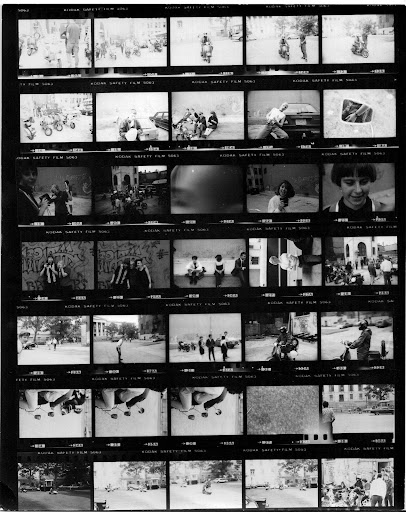
Contact Printing

A contact print is a print the size of a negative. A contact print from a 35mm negative measures 1"x1.5".
A contact sheet is a large sheet of paper, usually 8"x10" or 8.5"x11", containing a series of contact prints.
"Contacts" are best used as proof sheets. An entire roll of film is contact-printed onto one single sheet of paper. Each contact print is then examined for its value, and only those that look promising need be individually printed, saving much time and money (in wasted chemicals and printing paper).
Contact sheets also provide a useful way to file work by numbering rolls of negatives to correspond to each contact sheet. The back side of a contact sheet can also be used to store additional information, such as where, when or how the pictures were taken, which you have been noting and keeping track of as per the assignments.


To make a contact print:

1. Position the enlarger housing near the top of its post, so it projects a wide circle of light when turned on. The aperture setting is optional; start with f8.
2. Place a fresh sheet of 8" x 10" printing paper, emulsion side up at the base of the enlarger. (remember how to tell emulsion if you cannot tell from sight- get a finger tip wet, the sticky side will be the emulsion side). Do not use an easel.
3. Position several strips of negatives emulsion side down in rows on the paper.
4. Gently lower a clean sheet of glass over both the negatives and paper to hold them flat and tight together.
5. Turn on the enlarger for a predetermined period of time. Try f 8 at 8 seconds. Aim for a good "overall" exposure as some negatives will print light, and others too dark.
6. Once exposed, process the contact sheet like we did with the photograms, or any other print. If the contact is too dark, lessen the exposure, conversely if it is too light, increase the exposure time.

Understanding the Negative

A negative image is a total inversion of a positive image, in which light areas appear dark and vice versa. When picking an image to print, look at the negative. From the bracketing assignment you should have an idea of what different exposures can look like in negative form. We want you to print from negatives with the most "information" available. A negative that is very dark and opaque is referred to as being "thick" which means it has lots of information and may have been over exposed, over developed or both. A negative that is very transparent is referred to as being "thin" meaning it does not have very much information from being under exposed, underdeveloped or both. The best negatives have all the information there so you can choose what you would like to make viewable. If you bracketed and the negative which had the most information was not at the "normal" light meter reading you should adjust your ISO (film speed to reflect this) 


For example:


If you shot 3 frames with an ISO of 400. The first frame was exactly as the meter read, the second was under and the third was over (each by a stop)), we would look to see which negative had the most available information. If your first negative from each image was it, keep shooting at an ISO of 400. If your second image was underexposed by a stop and looked the best, keep using 400 speed film, but make your ISO setting read 200. This acts similarly to halving a stop or underexposing by a stop. Alternatively, if your third frame was over exposed by a stop and looked the best, you would continue to use 400 speed film but set your ISO and set your camera settings to the normal meter readings with the new ISO.

Getting Ready to Enlarge

The negative is positioned in a negative carrier, which fits into the enlarger below the condenser or diffuser. most carriers are two pieces of metal or plastic that hold negatives flat and in place. The carrier has a cut-out the size and format of a negative.

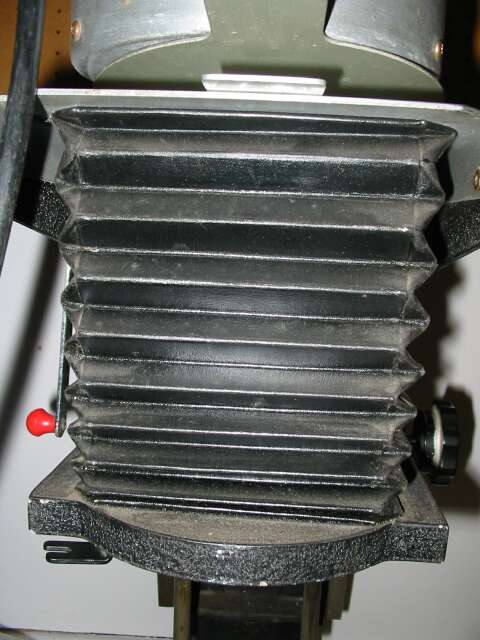
A Bellows is located under the negative carrier. It is used to focus the image. As the bellows is expanded or contracted, the lens moves closer to or farther from the baseboard until the image is sharp.
As the enlarger housing is moved up the post away from the baseboard, the projected image size is increased. As it moves down, the image becomes smaller.

Enlarging lens. An enlarging lens works somewhat like a camera lens to focus the image and control the light. The lens must be matched to the size of the negative being enlarged. All camera and enlarging lenses have a certain covering power, that is , the amount of even illumination that a lens projects. Like camera lenses, enlarging lenses are classified according to their maximum aperture. An f 4 enlarging lens allows more light through it than an f 5.6 enlarging lens. More light means the the images will be easier to see and focus.

Focusing magnifier or grain finder. A focus magnifier enlarges the projected image to facilitate more accurate focusing. The image can be focused without a magnifier, but the results are less likely to be sharp. A grain finder enlarges the grain patterns of the projected negative, allowing even easier accurate focusing.


Easel. An easel holds printing paper flat and in place under the enlarger. It consists of two parts: a base on which the paper is laid and positioned, and a hinged top piece with a crossing metal "blades" to hold the paper flat. The desired image size of the print is set by adjusting the metal blades along a ruled molding on the edges of the top piece of the easel.


Making a print requires a variety of judgements and interpretations, much more so than when developing a roll of film. What follows are the basic printing steps, along with discussion of some of the judgement areas.

Setting Up The Negative

1. Put a strip of negatives in the negative carrier, with the negative to be printed framed by the cut-out section. The negative needs to be positioned with its emulsion side (the dull/matt surface) down (shiny side up!) or the print will have the wrong orientation- basically, it'll be backwards.
2. Use a blower or brush to remove dust that might have accumulated on either side of the negative.
3. Close the carrier, and fit it tightly in place in the enlarger housing.
4. Set the easel for the approximate images size for the print. the image size is the size of the printing paper minus the borders. For example, a 7.5" x 9.5" size image on an 8" x 10" sheet of paper has a 1/4" border all around. The easel has size scales on it's top and sides for setting the image size.
5. Place the easel on the base of the enlarger.
6. Turn on the safe lights, and turn off the room lights.
7. Turn on the enlarger. The enlarger will project the negative image down to the easel.
8. Open the aperture of the enlarging lens to its widest f-stop in order to project enough light to see the image clearly. Now the size of the image must be set and the negative focused.
9. To set the image size, move the enlarger housing up and down on its post. The position of the easel on the enlarger base will need to be adjusted until the projected image is framed tightly by the easel blades. As the housing moves up the post, the projected image becomes larger; as it moves down, the image becomes smaller. Once the desired image size is set, lock the housing in place on the enlarger post.
10. Once the image size is set, focus the negative by turning the focusing knob to expand tor contract the bellows. The image size will need minor adjustment at this point, and the easel may need to be moved around. Adjust the size first, then the focus and easel location. Keep readjusting until the projected image is the correct size and in focus. Make sure to use a piece of the paper you are printing on to focus on as the slightest  distance change will affect the critical focus.

Making a Test Strip

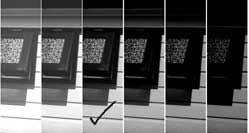
A test strip is a section of printing paper with several different exposures made from a single negative. It is simple to make and can save much time and money on wasted printing paper and chemicals.
To make a test strip:
1. Close down the lens aperture from it's wide-open position. Any f-stop can be used for printing, but the middle stop f 8 is a good starting point.
2. Take out a sheet of printing paper from its box. When opening the box make sure that no light other than safelight hits the paper. Lights from mobile phones, ipods, other people enlarging, enlarger light leaking from the negative area are all problematic. Make sure to close your box and keep your paper safe.
3. Cut the sheet of printing paper into 9 smaller rectangles. Only one will be needed, place the rest back in the box right away for future tests.
4. Lay the strip of paper in the easel, emulsion (shiny/sticky) side up. Figure out where the most important part of your image is, and with the most range of tonality, and try to place your test strip in that part of the frame.
5. Set your timer to 4 seconds. It is an arbitrary starting point as exposure times can vary widely.
6. Switch on the timer and expose the entire stripe for 4 seconds.
7. Change your timer to 2 seconds.
8. Use and opaque piece of cardboard to cover a bottom segment of paper.
9. Switch on the timer and expose the uncovered area of the strip for that time. If the timer is not properly functioning use the second hand of the clock in the darkroom, and switch the enlarger on and off manually. This will work, but it will provide less consistent exposure times than an enlarging timer.
8. Move the cardboard, taking care not to move the strip of paper or the easel along with it. Leave another part of the paper uncovered and expose this.
9. Move the cardboard and repeat the exposure process until there is no more paper left. Previously exposed sections will continue to receive additional amounts of exposure.

Viewing the Test Strip

Now the test strip has a latent image with different exposure times starting at 4 seconds, 6, 8, 10, and so on. Once developed, the test strip should provide a good guide to the required print exposure for that particular negative.
The finished test strip will have a range of exposures; some may be light and some dark. If all exposures are too light or too dark, make another test strip. The ideal strip is dark on one end and light on the other.
If the entire strip is too dark, cut back the exposure. Either close down the lens- try f 11.
If the test strip is too light, increase the exposure, open the lens to f 5.6
* Once we begin using fibre paper, the prints will have a "dry-down" affect. Which means the prints will darken when they have dried. This is not the case with gross RC paper.
If you find that a strip of 10 seconds looks a little light and your strip of 12 seconds is a little dark, set your timer to print at 11 seconds and your image should come out looking the way you want.
If you have a strip that looks good but has an exposure time of less than 8 seconds close down the lens by a stop and double the time:
ex: an exposure of 5 seconds at f 8 would be better if it were 10 seconds at f 11 (this will be explained in further detail next week when we deal with burning and dodging). Alternatively, if there is a very long exposure, lets say 24 seconds at f 8, open up your enlarging lens one stop and halve the time;12 seconds at f 5.6.

Once you have determined the correct exposure settings, it's time to make a print!
.

Thursday, November 18, 2010

Week 2 Assignment Due week 3

What you will need to bring for class:
your camera
2 rolls of film, exposed and developed (one from the first assignment and one from the second)
a box of FIBER PAPER
Negative preservers
A notebook
a pencil
For those of you who still owe £- this is your last chance!!!

Some of you need to make up the assignment from last week, we expect this to be done (exposed and developed) as well as this week's assignment for Wed.

Assignment:

Expose 1 roll of film; HP5 36 exp. of whatever subjects you would like in daylight.
Note all camera settings for each exposure.

After exposure develop this film. Give yourself enough time so it is dry before next class. Do not wait until Wed afternoon.

Cut film strip into segments of 5 frames and put in your negative preservers. Bring all negatives to class